Pausing the Merge Queue
Understand the pause feature and how to use it during CI incidents.
Pausing Mergify’s Merge Queue suspends its automation, typically during a CI incident. This page explains what pausing does, its impacts, and when to use it.
What Does Pausing Do?
Section titled What Does Pausing Do?When you pause the merge queue:
-
Suspended: The merge queue will be suspended.
-
Addition to the Queue Continues: Even with a paused merge queue, new pull requests can still join the queue. This ensures pull requests remain organized and ready for when operations resume.
-
Stops Scheduling and Actions: After pausing the merge queue, Mergify will not schedule new checks or merge pull requests. Pull requests can enter the queue but won’t be acted upon.
-
Cancel Running Checks: When you pause the queue, Mergify attempts to cancel any running checks for pull requests that are in the queue and will wait for the queue to be resumed.
How to Pause the Merge Queue
Section titled How to Pause the Merge QueueFrom the Dashboard
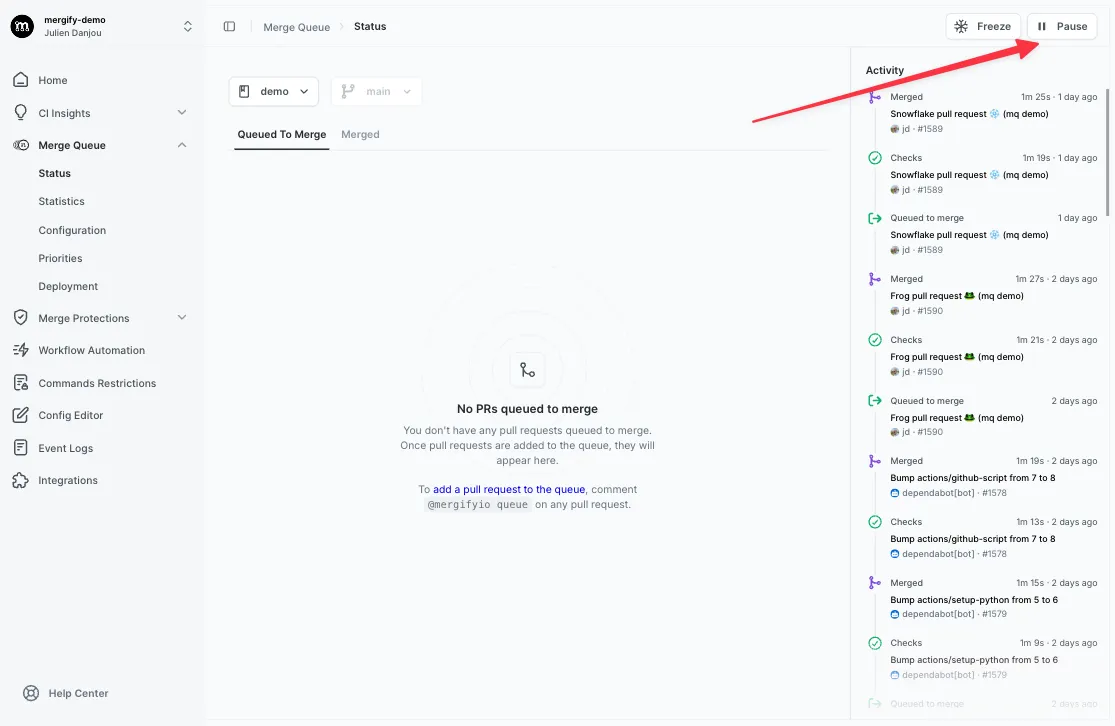
Section titled From the DashboardNavigate to your Mergify dashboard. There you’ll find an option to pause the merge queue. Clicking on this will suspend the queue.
Using the CLI
Section titled Using the CLIPause the queue from the terminal with a reason (required):
mergify queue pause --reason "deploying hotfix"Resume when ready:
mergify queue unpauseSee the queue CLI reference for all pause options and the rest
of the queue commands.
Using the API
Section titled Using the APIYou can also pause the merge queue programmatically using the Mergify API.
Typical Use Cases
Section titled Typical Use CasesCI Incidents
Section titled CI IncidentsDuring a major incident with the CI system, if checks are likely to fail and eject pull requests from the queue, pause the merge queue until the incident is resolved.
Non-CI Incidents
Section titled Non-CI IncidentsIf an incident is unrelated to the CI, like a production issue, but you wish to halt merging while allowing checks to run, then the scheduled freeze feature is a more suitable choice.
Benefits of Using the Pause Feature
Section titled Benefits of Using the Pause Feature-
Maintain Queue Integrity: During CI failures or other disruptions, pausing ensures pull requests stay in the queue, preserving their order.
-
Flexibility: It provides an immediate response tool during unexpected complications, giving you control over the merge process.
-
Reduce Noise: Constantly failing checks during a CI incident can create unnecessary notifications. Pausing the queue mitigates this.
Was this page helpful?
Thanks for your feedback!